Store Reports I'm interested

Know where every box, label and dollar went.

Automatic sales, shipping and supply audits for shipping-store owners.

I'm interestedSee pricing

Frederiksen Software Consulting · November 2027

The problem

Your numbers live in portals that never talk to each other.

MPOS

Sales, items, associates and prices

CAMS

Corporate-account packaging audits

UPS Billing Center

What UPS actually charged

UPS My Choice

Labels with sizes and weights

Stamps.com

Postage, voids and refunds

Bunzl

Supply orders and deliveries

Timberline

Box and master-carton orders

TUPSS Marketplace

Corporate supply orders

Most losses are small, daily and invisible from the register.

A box used but never rung up

A label refund that clears weeks later

A price lowered at the counter

A package re-billed on the UPS invoice
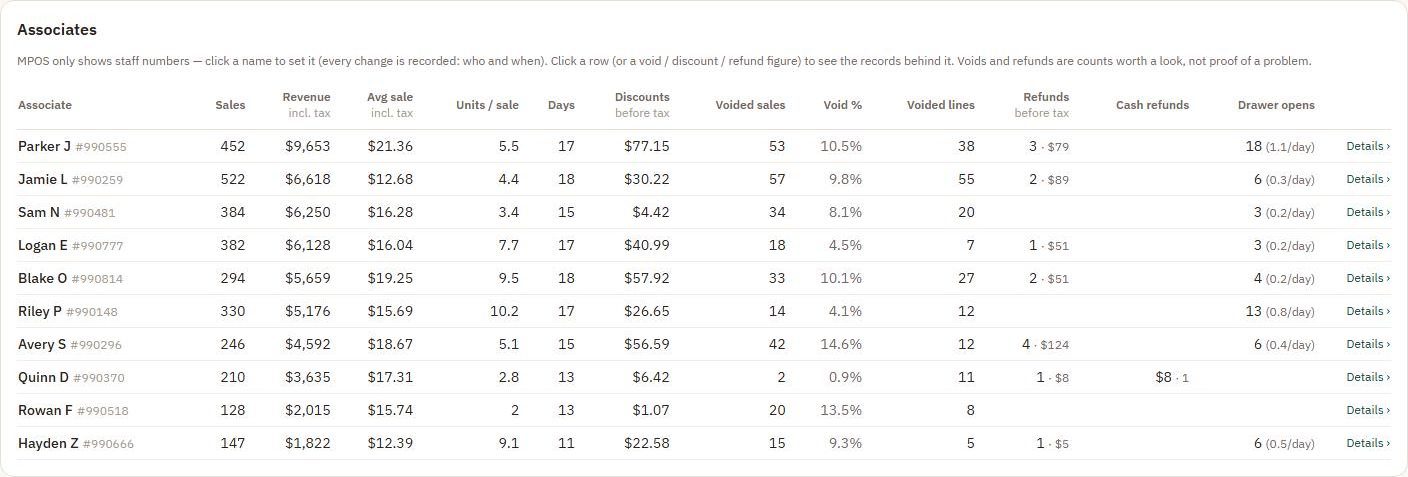
Store Reports Associates report (demo data): sales, revenue, discounts, voided sales, void percentage, refunds, cash refunds and no-sale drawer opens for each associate
The Associates report, with demo data: voids, discounts, refunds and no-sale drawer opens for each associate.

How it works

Set it up once. It collects by itself, all day.

  1. Store PC

    A Chrome collector reads MPOS, CAMS, UPS and Stamps.com in the background.

  2. Cleaned

    Customer and card details are removed before anything leaves the PC.

  3. Your server

    Your own private install, encrypted and backed up off-site.

  4. Your reports

    On your phone or laptop, with email alerts when something needs you.

Sales every 10 minutes · CAMS hourly · UPS invoices and supply orders weekly

What you see

One place for sales, shipping, supplies and prices.

Demo data Busy hours heatmap from the Store Reports demo: average sales per open day by weekday and hour, darker green for busier hours, busiest late morning to mid-afternoon on weekdays

Sales

Busy hours, categories, items and associates.

Shipping audit

Boxes and packaging checked against the UPS invoice.

Inventory and shrink

Counts, deliveries, and shrink at cost and at your price.

Prices

Your MPOS price list and every sale rung below it.

Corporate

CAMS packaging and client-billed labels, matched.

Alerts

An email when a source stops or needs a sign-in.

Own more than one store?

Every store in one view, side by side.
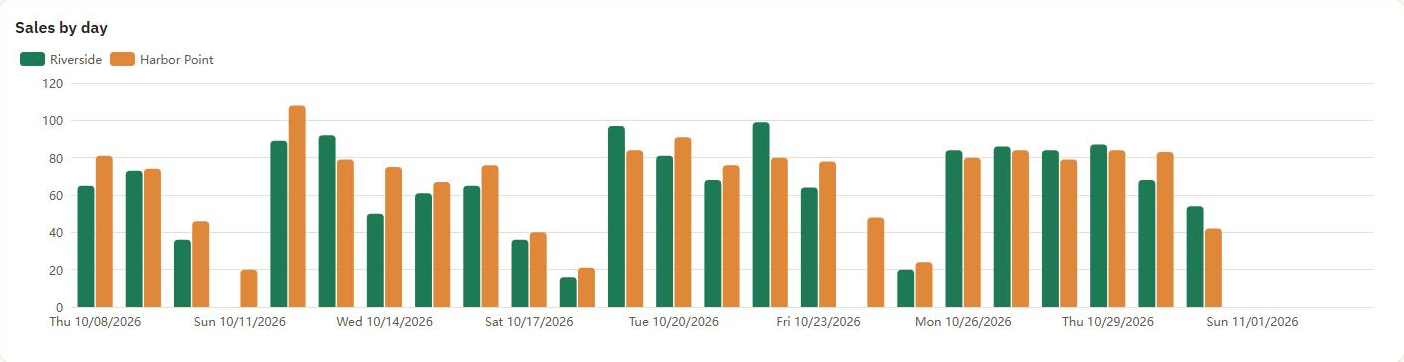
Demo data
Sales by day chart from the Store Reports demo: one green bar for Riverside and one orange bar for Harbor Point on each day from October 8 to November 3, 2026

One store or all

Every report, for one store or all together.

Prices across stores

A column per store; filter to prices that differ.

UPS discount by store

What each store earned, month by month.

Store columns

Voids, refunds and flags carry a store column.

Proven at our own stores

Every flag lands in one queue to review.
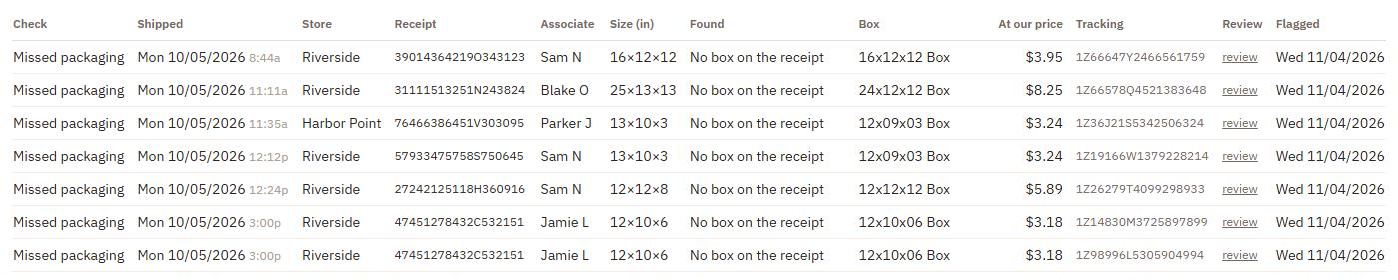
Shipping audit · To reviewDemo data
Shipping audit To review queue from the Store Reports demo: packages flagged for missing packaging, each with store, receipt, associate, package size, the box it matches, its price, tracking number and a review link

45

packages flagged from one UPS invoice, 24 in weeks already reviewed

14 days

of history filled in on the first run, so reports work on day one

9

missed CAMS transactions found in 60 days

Your data

Your sales stay on your own server. Nobody else sees them.

Your own install

Every owner gets a private server, not a corner of a shared database. Encrypted, and backed up off-site.

Read-only collector

It never sees your MPOS password, and strips customer and card details before sending.

Only your stores

Your install refuses data from any store you don't own. Only owners and GMs can sign in.

Getting started

Four steps to your first report.

  1. We set up your server

    Your private install, ready in 3 days. You sign in with one account for all our tools.

  2. Add the collector

    Install it in Chrome on one PC per store and paste the token Store Reports gives you.

  3. Sign in to MPOS once

    With that store's own login. The collector keeps its own tab and stays signed in.

  4. Read your reports

    The first run fills in 14 days. From then on it collects every 10 minutes.

Pricing

One monthly price, your own server included.

Store Reports

$59 / month

for your first store, $49 / month for each extra store. Your own server and off-site backups included.

Setup (server setup and configuration): $49 Free, one time.

Founding owners: the first 25

30% off

for your first year: $41.30 / month for your first store, $34.30 / month for each extra. Setup free.

Become one of our 25 founding owners.

Tell us who you are and which stores you run. We'll email you to set up a walkthrough with your own store's numbers.

I'm interested

Independent software from Frederiksen Software Consulting LLC. Not made or endorsed by The UPS Store, Inc.